The whole guide in two and a half minutes.
A narrated walkthrough of what AGENTS.md does, how the folder grows, and the simple rhythm that keeps a project moving. Captions are available in the player.
Read the transcript
Your project folder can remember with you. This is a simple way to work with AI on a project, stay organized, and build a trustworthy record of what you're learning.
It starts with one file: AGENTS.md. Think of it as a project handbook, a small dashboard, and a guide for keeping useful memory. It tells the AI what the project is about, keeps you focused on the mission and next steps, and supports a trustworthy record. And you stay in charge. The AI is a collaborator, not the owner of your project.
Your folder can begin this simply: the AGENTS.md file, and a notes folder for dated records. Folders for research, evidence, and experiments come later, only when your work actually needs them.
The folder keeps two kinds of memory. AGENTS.md answers, where are we now? Your mission, current direction, key questions, and next action. The notes folder answers, how did we get here? Keep the orientation short and current, and don't rewrite history when your understanding changes.
A simple rhythm keeps the project moving. Orient to your mission. Act on the next useful step. Capture what happened in your notes. Reflect on what you're learning. Choose what should happen next. Then repeat.
Capture what matters, close to when it happens: the date, the people, what happened, the evidence, your interpretation, open questions, and a possible next step. Not every conversation needs a note. Keep the ones that change what you understand.
To set it up, make a folder for your project, copy the template into it as AGENTS.md, and start your AI tool from inside that folder.
Then just talk. Explain what you're trying to accomplish, even if you're not sure yet. The assistant can help you draft a mission and next steps, and it checks the wording with you.
Your direction can evolve as you learn. Change it on purpose, and keep your earlier notes, so you can always see how and why the project changed.
And remember: being in the folder doesn't mean being public. Material can be personal, for your team, for a class, or for everyone. Before you share anything, check for credentials, private conversations, and identifying information.
Begin small. Preserve what actually happened. And let your project grow from evidence.
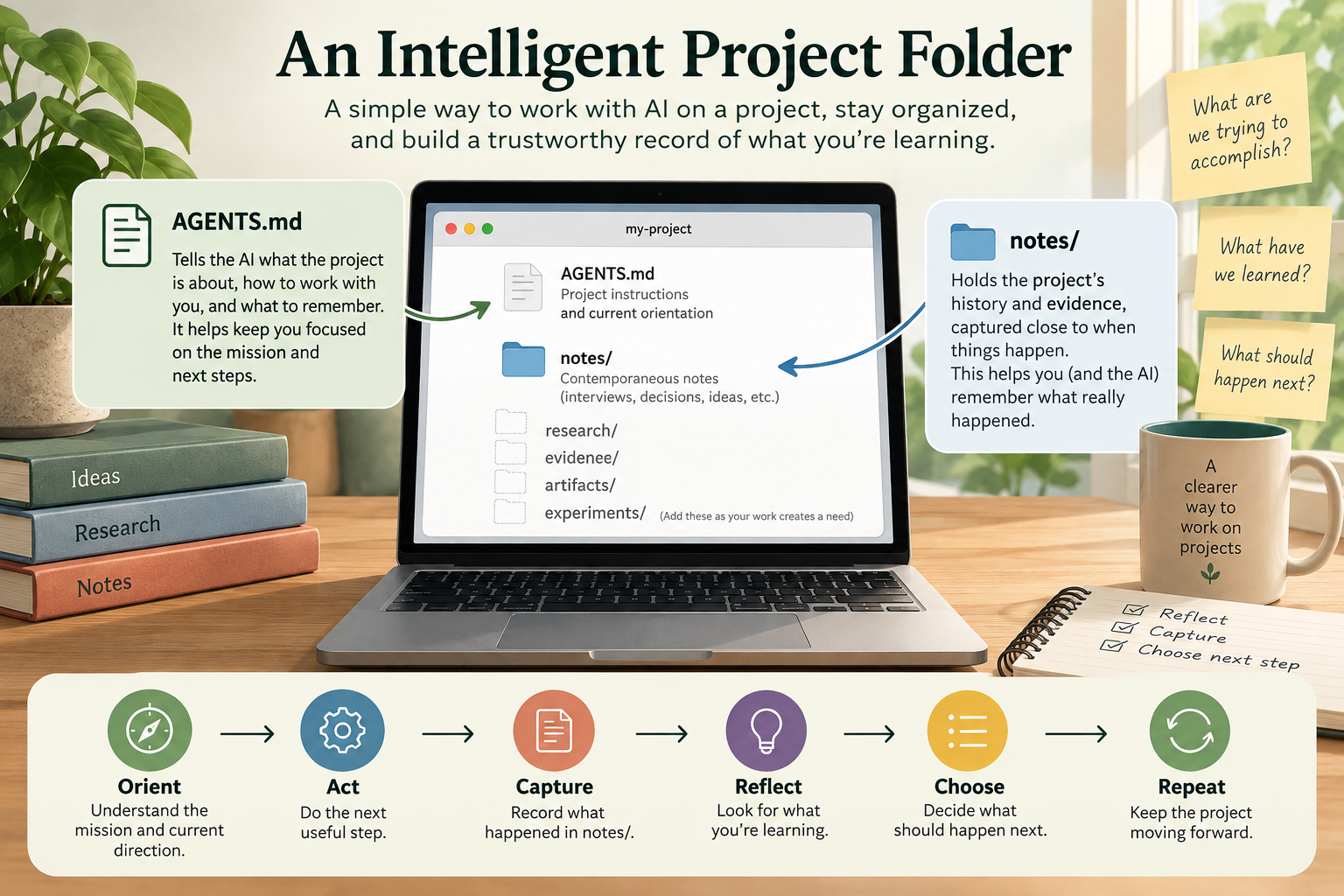
What is this file, in plain English?
Think of AGENTS.md as a combination of a project handbook, a small dashboard, and instructions for keeping a useful project memory.
Instead of treating every conversation as isolated, the assistant is asked to pay attention to your project’s purpose, evidence, decisions, uncertainty, and history.
The top of the file holds a concise Mission, Current Direction, Current Questions, and Next Action. Detailed history belongs elsewhere.
If something is unknown, the project should say that it is unknown. The assistant should not manufacture interviews, results, decisions, or sources.
You begin with very little structure. New folders and practices appear only when the work actually needs them.
You are still in charge. The file asks the AI to act as a collaborator and steward of project memory—not as the owner of the project or the person making consequential decisions for you.
Your folder can begin this simply.
That is enough to begin. A notes/ directory can hold dated records as meaningful work happens. Other folders—such as research, evidence, experiments, or artifacts—should be added only when useful.
“Where are we?” and “How did we get here?”
AGENTS.md
The current orientation.
What is our mission? What are we doing now? What important questions remain? What should happen next?
notes/
The project history.
What happened? What did we observe? What evidence appeared? What changed? What did we think at the time?
The distinction matters. You do not want to rewrite history every time your understanding changes. Old notes remain available while the short orientation at the top of AGENTS.md stays current.
You mostly just work and talk.
You do not need to fill in hundreds of lines. Start your AI tool from the project folder, then have a normal conversation about what you are trying to accomplish.
Open the project folder in your AI-enabled workspace.
The assistant needs access to the folder so it can read AGENTS.md and, when permitted, maintain project files.
Explain what you want to accomplish.
You can be uncertain. Describe the problem, curiosity, class assignment, research question, product idea, or outcome you care about. The assistant should not invent a mission before enough information exists.
Establish a simple initial mission.
Once the purpose is reasonably clear, put it in the Mission section. Current Direction, Current Questions, and Next Action can be filled in as they become clear.
Do real work.
Research, interview people, build things, test ideas, meet with collaborators, collect evidence, write, design, or experiment—whatever your project actually requires.
Capture important developments.
Meaningful observations, decisions, feedback, experiments, failed attempts, questions, and changes in direction can become lightweight dated notes. Trivial interactions do not need permanent records.
Use the memory later.
Ask questions such as “Why did we change direction?”, “What evidence supports this assumption?”, or “What remains unresolved?” The assistant can consult the project record instead of guessing from memory.
“I’m starting a new project. Help me think through what I’m trying to accomplish and establish an initial mission. Don’t assume the solution yet.”
A simple cycle keeps the project moving.
Understand where you are. Do something useful. Preserve what matters. Consider what the new evidence changes. Choose a sensible next action. Then continue.
What the system is—and is not—for.
Do
- Keep original records and uncertainty.
- Record important events close to when they happen.
- Distinguish evidence from interpretation.
- Let structure emerge from actual needs.
- Consider whether material is personal, team, class, or public.
- Use previous notes when making later decisions.
Don’t
- Document every tiny interaction.
- Invent information to make notes look complete.
- Create lots of folders just because they seem professional.
- Turn repeated assumptions into “facts.”
- Assume everything in the folder is safe to share.
- Let the AI quietly take ownership of the project.
Being in the folder does not mean being public.
Project material can have different audiences: personal, team, class, or public. Before sharing a repository, presentation, dataset, or other artifact, consider credentials, private conversations, identifying information, and other sensitive material.
Things beginners often wonder about.
Does AGENTS.md itself run a program?
No. It is an instruction file. Its usefulness depends on working with an AI environment that reads the file and has whatever file permissions or tools are needed to act on those instructions.
Do I need to fill out the whole file before starting?
No. The template is deliberately designed to start with an unestablished mission and minimal structure. The project orientation should develop from real work rather than being invented in advance.
Does the AI automatically know everything that happened?
Do not rely on that. Important events should be preserved in project records. The point of the notes is to make important history inspectable later rather than depending on vague recollection.
Should every conversation become a note?
No. Capture interactions that introduce meaningful ideas, evidence, decisions, feedback, experiments, changes in understanding, important questions, or reflections likely to matter later.
Can the project change direction?
Yes. The mission and direction can evolve, but important changes should be deliberate. Preserve the earlier records so you can understand how and why the project changed.
Ready to begin?
If your folder is already at ~/Documents/my-project, enter it and start the AI agent or workspace you plan to use from there.
cd ~/Documents/my-projectNew to this? The workshop tutorial walks you through building your intelligent folder in Codex, with a browser-based alternative if you do not have Codex access.
Then begin by explaining the project you have in mind. You do not need to have the answer—or even a perfectly formed question—before you start.